The Thinking Behind What’s Next!

 Blogs
MacSvn for macOS: Features, Usability, and How It Simplifies SVN Operations
MacSvn - SVN Client for macOS For handling files, documents, and tracking the changes in one place with multiple users working on the same file might be a challenging part. But, using Subversion, it is possible to set up a LAN server and use a client software on every machine to connect to the server and work on the same file and keep every user updated with the latest version. So to mitigate the challenges, particularly without a user-friendly client tool on MacOS, is difficult. So, macSvn offers a simple and efficient solution to this problem with its user-friendly graphical interface. It makes basic SVN operations such as checking out repositories, committing changes, and examining logs easy without the requirement of complicated command-line commands. The software is lightweight, simple to use, and gives a native feel to macOS users, thus, version control is easier and faster. Getting MacSvn was pretty easy, especially since it’s on SourceForge – those downloads can be a little clunky sometimes. The app itself opens fast and has a simple, Mac-like look. The user interface is really basic, which is good if you like things simple. Features & Functionality MacSvn does what you need it to do: get code, send your edits back, keep things up-to-date, sort out messes when people change the same stuff, and see what’s been happening. You can make branches and tags without too much trouble. The thing that shows you the difference between versions is good enough for most normal changes. It also works okay with Finder on macOS, so you can see if a file’s been changed and get to SVN commands by right-clicking. Browsing Your Working Copy with MacSvn Now, some users might find MacSVN a bit shallow compared to paid options. Stuff like merge tracking, really detailed conflict fixes, and seeing who changed what line is either basic or not there at all. For simple stuff like getting the latest version or sending in your changes, it’s good. Moreover, if you’re in a big team with a complicated setup, macSvn is the perfect option. Efficient Log View and Quick File Comparisons The MacSvn app runs pretty smoothly with both smaller and larger projects. Things like updating and committing are quick, especially when looking at logs or comparing files. On the bright side, it doesn’t use much memory, which is great if you’re looking for something that won’t slow down your computer. Personalizing Your Workflow with Global Parameters in MacSvn MacSvn gives users the option to set global parameters to customize their SVN experience on macOS. These settings enable users to specify preferences such as default repositories, username/email for commits, and global ignore lists—basically, customizing how they use version control. Whether you have multiple projects to manage or simply wish to simplify your day-to-day tasks, modifying these global settings can save time and prevent unnecessary manual setup. This feature provides a degree of convenience for users who require basic customization without the overhead. Usability & Experience macSvn’s user interface is really intuitive and easy for beginners. Its simple, uncluttered design makes it simple to use without having to memorize arcane command-line commands. Integrated diff viewing allows you to view changes in your code immediately, without the need for extra tools. Although it has a retro look, that simplicity is part of its appeal, providing a stable and distraction-free environment that gets the basics right. MacSvn Working Copy Overview macSvn promotes learning and discovery by hand, which makes it an ideal application for users who prefer to learn tools by doing. Although it doesn’t have so much documentation that it overwhelms you, its clean architecture results in the majority of users quickly learning how to use it with little instruction. Its simplicity promotes a do-it-yourself methodology, which enables users to gain confidence working through real-world version control issues. macSvn is a good choice for Mac users who want a straightforward, GUI-based Subversion client. It does the job for simple SVN operations and has the benefit of being free and lightweight. If you’re an occasional user, student, or working on an older project that still utilizes Subversion, macSvn is worth a try for production environments or large-scale teams.
Discover Our Blogs
MacSvn for macOS: Features, Usability, and How It Simplifies SVN Operations
MacSvn - SVN Client for macOS For handling files, documents, and tracking the changes in one place with multiple users working on the same file might be a challenging part. But, using Subversion, it is possible to set up a LAN server and use a client software on every machine to connect to the server and work on the same file and keep every user updated with the latest version. So to mitigate the challenges, particularly without a user-friendly client tool on MacOS, is difficult. So, macSvn offers a simple and efficient solution to this problem with its user-friendly graphical interface. It makes basic SVN operations such as checking out repositories, committing changes, and examining logs easy without the requirement of complicated command-line commands. The software is lightweight, simple to use, and gives a native feel to macOS users, thus, version control is easier and faster. Getting MacSvn was pretty easy, especially since it’s on SourceForge – those downloads can be a little clunky sometimes. The app itself opens fast and has a simple, Mac-like look. The user interface is really basic, which is good if you like things simple. Features & Functionality MacSvn does what you need it to do: get code, send your edits back, keep things up-to-date, sort out messes when people change the same stuff, and see what’s been happening. You can make branches and tags without too much trouble. The thing that shows you the difference between versions is good enough for most normal changes. It also works okay with Finder on macOS, so you can see if a file’s been changed and get to SVN commands by right-clicking. Browsing Your Working Copy with MacSvn Now, some users might find MacSVN a bit shallow compared to paid options. Stuff like merge tracking, really detailed conflict fixes, and seeing who changed what line is either basic or not there at all. For simple stuff like getting the latest version or sending in your changes, it’s good. Moreover, if you’re in a big team with a complicated setup, macSvn is the perfect option. Efficient Log View and Quick File Comparisons The MacSvn app runs pretty smoothly with both smaller and larger projects. Things like updating and committing are quick, especially when looking at logs or comparing files. On the bright side, it doesn’t use much memory, which is great if you’re looking for something that won’t slow down your computer. Personalizing Your Workflow with Global Parameters in MacSvn MacSvn gives users the option to set global parameters to customize their SVN experience on macOS. These settings enable users to specify preferences such as default repositories, username/email for commits, and global ignore lists—basically, customizing how they use version control. Whether you have multiple projects to manage or simply wish to simplify your day-to-day tasks, modifying these global settings can save time and prevent unnecessary manual setup. This feature provides a degree of convenience for users who require basic customization without the overhead. Usability & Experience macSvn’s user interface is really intuitive and easy for beginners. Its simple, uncluttered design makes it simple to use without having to memorize arcane command-line commands. Integrated diff viewing allows you to view changes in your code immediately, without the need for extra tools. Although it has a retro look, that simplicity is part of its appeal, providing a stable and distraction-free environment that gets the basics right. MacSvn Working Copy Overview macSvn promotes learning and discovery by hand, which makes it an ideal application for users who prefer to learn tools by doing. Although it doesn’t have so much documentation that it overwhelms you, its clean architecture results in the majority of users quickly learning how to use it with little instruction. Its simplicity promotes a do-it-yourself methodology, which enables users to gain confidence working through real-world version control issues. macSvn is a good choice for Mac users who want a straightforward, GUI-based Subversion client. It does the job for simple SVN operations and has the benefit of being free and lightweight. If you’re an occasional user, student, or working on an older project that still utilizes Subversion, macSvn is worth a try for production environments or large-scale teams.


How Web3 is Revolutionizing iOS App Development
Introduction: The Rise of Web3 in iOS App Development The evolution of the internet has brought forth Web3, a new paradigm built on decentralization, blockchain technology, and enhanced user control. With Apple’s iOS ecosystem embracing blockchain-based applications, Web3 is set to revolutionize iOS app development. From decentralized finance (DeFi) apps to tokenized in-app economies, the shift to Web3 opens up new opportunities for developers and users alike. Understanding Web3: A Brief Overview Web3 refers to the next generation of the internet, characterized by decentralization, blockchain, and smart contracts. Unlike the Web, where centralized entities control data, Web3 enables peer-to-peer interactions, eliminating the need for intermediaries. This fundamental shift provides increased security, transparency, and user sovereignty over data and digital assets. Why Web3 Matters for iOS Apps As Apple continues to shape the mobile app landscape, integrating Web3 features into iOS apps can enhance security, offer decentralized finance solutions, and create new revenue streams. With an increasing number of users adopting blockchain technology, iOS apps that leverage Web3 can offer a competitive edge and innovative user experiences. Businesses looking to integrate Web3 into their applications can collaborate with an iOS App Development Company to ensure seamless implementation. Decentralization: Shifting Control to Users Traditional apps rely on centralized servers, making them vulnerable to data breaches and single points of failure. Web3-based iOS apps leverage blockchain technology to decentralize control, ensuring that users have ownership of their data. This decentralization enhances trust and reduces dependency on third-party service providers. Smart Contracts: Automating Trust in iOS Apps Smart contracts are self-executing agreements written in code that run on blockchain networks. In iOS apps, smart contracts can automate processes such as payments, agreements, and in-app transactions without the need for intermediaries. This automation improves efficiency and eliminates the risks associated with traditional contracts. Enhanced Security with Blockchain Technology Security concerns remain a top priority in app development. Web3-based iOS apps utilize cryptographic principles to secure transactions and data storage. Unlike traditional databases, blockchain technology ensures that data is immutable and tamper-proof, reducing the risks of hacks and fraud. Tokenization & In-App Economy: A New Revenue Model Web3 enables tokenization, allowing iOS apps to introduce their own digital tokens for in-app purchases, rewards, and governance. This decentralized economy fosters user engagement and incentivizes participation. Play-to-earn and decentralized finance models further enhance monetization opportunities for app developers. Decentralized Identity: Empowering Users with Data Control Web3 brings decentralized identity (DID) solutions, allowing users to maintain control over their personal information. Instead of relying on third-party authentication services, users can authenticate themselves through blockchain-based identity solutions, reducing privacy concerns and data breaches. Web3 Wallet Integration in iOS Apps Crypto wallets are a crucial component of Web3-based apps, enabling secure transactions and digital asset management. iOS developers can integrate wallets like MetaMask, Trust Wallet, or Apple’s own secure enclave technology to facilitate seamless blockchain interactions. This integration opens doors to decentralized finance (DeFi), NFT marketplaces, and more. Challenges of Implementing Web3 in iOS Development While Web3 offers exciting possibilities, it also presents challenges such as: - App Store Restrictions: Apple has strict policies regarding blockchain apps, requiring compliance with their guidelines. - User Education: Many users are unfamiliar with Web3 concepts, necessitating intuitive UI/UX designs. - Scalability Issues: Blockchain networks often struggle with transaction speed and costs, impacting app performance. - Regulatory Compliance: Governments worldwide are still formulating policies around blockchain and crypto transactions, making compliance a moving target. Tools & Frameworks for Web3 iOS App Development To build Web3-powered iOS apps, developers can leverage tools like: - Ethereum & Solana SDKs: For blockchain-based app development. - Web3.js & ethers.js: JavaScript libraries for interacting with blockchain networks. - IPFS (InterPlanetary File System): A decentralized storage solution for app data. - WalletConnect: To integrate crypto wallets into iOS apps. The Future of Web3 in the Apple Ecosystem As Web3 adoption grows, Apple is likely to refine its approach toward blockchain applications. With potential advancements in decentralized applications (dApps), NFT marketplaces, and DeFi solutions, the integration of Web3 within iOS apps will continue to expand. Developers who embrace this shift early will be well-positioned to innovate in this evolving digital landscape. Businesses looking to leverage Web3 technology can hire iOS App Developers with expertise in blockchain integration to stay ahead of the competition. Conclusion: Embracing the Web3 Revolution in iOS Apps Web3 is transforming iOS app development by introducing decentralization, smart contracts, enhanced security, and new monetization models. While challenges exist, the benefits of Web3 integration far outweigh them, paving the way for more secure, user-centric, and innovative iOS applications. As blockchain technology advances, iOS developers should stay ahead of the curve by exploring and integrating Web3 solutions into their apps.


What is Unix? A Beginner’s Guide for iOS Developers
What is Unix? Unix is a powerful, multiuser, multitasking operating system that has been the foundation of many modern operating systems, including macOS and Linux. It was designed to provide a stable, secure, and efficient computing environment. Brief History and Evolution Unix was originally developed in the late 1960s at AT&T Bell Labs by Ken Thompson and Dennis Ritchie. It quickly became popular in academic and research institutions, leading to the development of multiple Unix-like operating systems. Over time, Unix’s influence spread, giving rise to systems like BSD, Linux, and macOS, which form the backbone of modern computing environments. Why Unix is Relevant for iOS Development iOS developers work primarily on macOS, which is a Unix-based system. Understanding Unix is crucial for efficiently managing files, running scripts, debugging applications, and automating tasks in the development workflow. A strong grasp of Unix enhances an iOS developer’s ability to navigate macOS, use the terminal effectively, and optimize app development processes. How Unix Powers macOS and iOS Development Unix-Based Foundation of macOS macOS, the operating system for Apple’s Mac computers, is built on Darwin, a Unix-based system. This means that developers working with macOS benefit from the reliability, security, and efficiency that Unix provides. iOS, in turn, is derived from macOS, making Unix knowledge essential for iOS developers. How It Impacts iOS App Development Since macOS and iOS share a Unix foundation, many development tools and processes rely on Unix commands. The terminal, package managers, shell scripting, and version control all use Unix-based principles, making Unix knowledge a valuable asset for iOS developers. Key Unix Components in macOS - Terminal: Provides a command-line interface to interact with macOS. - Shell: Bash or Zsh (default in macOS Catalina and later) interprets commands. - Filesystem: Unix’s hierarchical structure helps manage directories and files. - Process Management: Unix handles running applications and background tasks efficiently. Essential Unix Commands for iOS Developers Navigating the Terminal The use of Unix commands in iOS development helps developers manage files, navigate directories, automate repetitive tasks, and interact efficiently with the development environment. Improved User Experience - cd [directory]: Change directory - ls: List files in a directory - pwd: Print current working directory File Operations - cp source destination: Copy files - mv source destination: Move or rename files - rm file: Remove files - mkdir directory: Create a new directory Viewing and Editing Files - cat filename: Display file contents - nano filename: Edit files using the Nano text editor - vim filename: Edit files using Vim Process Management - ps: Display running processes - kill process_id: Terminate a process - top: Monitor system performance and running processes Don’t miss Out: What is AI Trust, Risk, security, and management Using Unix for Development Efficiency Automating Tasks with Shell Scripts Shell scripting allows developers to automate repetitive tasks, such as setting up development environments, running test suites, or managing deployments. Managing Dependencies and Packages - Homebrew: A package manager for macOS that simplifies software installation. - CocoaPods: A dependency manager for Swift and Objective-C projects, managed via the terminal. Version Control with Git and Unix Commands - git init: Initialize a Git repository - git add .: Stage changes for commit - git commit -m "message": Commit changes - git push origin branch_name: Push changes to a remote repository Unix and Xcode: How They Work Together How the Terminal Can Enhance Xcode Workflows Unix commands help developers manage projects more efficiently within Xcode by providing automation, scripting, and debugging capabilities. Running Scripts in Xcode Developers can integrate shell scripts into Xcode’s build phases to automate tasks such as compiling resources, code linting, and managing dependencies. Debugging iOS Apps Using Unix Commands - lldb: The debugger for Xcode projects, used in the terminal. - log stream --predicate "subsystem == 'com.apple.yourApp'": Monitor logs in real time. Security and Permissions in Unix for iOS Development Understanding File Permissions and User Roles Unix uses a permission system to control access to files and directories. Each file has an owner, group, and permissions. Using chmod and chown Effectively - chmod 755 file: Modify file permissions. - chown user:group file: Change file ownership. Securing Development Environments - Use SSH for secure remote access. - Restrict file permissions to prevent unauthorized modifications. Practical Unix Use Cases for iOS Developers Automating Builds and Deployments Unix scripts can streamline the build and deployment process, reducing manual effort and increasing efficiency. Managing Logs and Debugging Errors Using Unix commands to filter and analyze logs helps developers diagnose issues quickly. Running Background Tasks with Cron Jobs - crontab -e: Edit cron jobs. - */30 * * * * /path/to/script.sh: Schedule a script to run every 30 minutes. Conclusion Unix is a fundamental skill for iOS developers, enabling efficient navigation, automation, security, and debugging. By mastering Unix commands and integrating them into the development workflow, developers can enhance their productivity and build more robust applications. Ready to Take Your iOS Development to the Next Level? Looking for expert assistance? Contact a leading iOS app development company to hire iOS developers and leverage top-notch iOS app development services for your next project! test


In-House vs. Outsourcing Mobile App Development: Which is Right for Your Business?
Building a mobile application entails sophisticated planning, and one of the most pivotal decisions is deciding on doing the app in-house or contracting an external vendor. Each strategy has pros and cons, making the choice largely subjective to business goals, budget, and competencies available. Realizing the primary distinctions between in-house and outsourcing mobile app development allows businesses to strategically align their decisions to be in favor of their success. Understanding In-House Mobile App Development In-house development is the opposite of outsourcing; it requires hiring internal specialists such as mobile app developers and lobby designers. Essentially, the firm builds a specialized team for mobile apps, composed of developers, designers, testers, and project managers. They all operate from a single location, which offers them tight control of the entire work process. Benefits of In-House Development Full Control Over the Development Process Having an in-house team allows you to control every step of app development, from planning to execution, which assures that the final product meets the company’s expectations. Better Collaboration and Communication Having developers, designers, and stakeholders in the same region guarantees unbarred and rapid communication and fosters fast decision-making. Faster Issue Resolution Bugs and technical challenges can be addressed immediately without waiting for external teams to respond. Challenges of In-House Development 1. Higher Costs Salaries, office space, software licenses, and ongoing training contribute to a significant financial investment. 2. Longer Hiring and Onboarding Time Finding skilled developers and training them takes time, potentially delaying project timelines. 3. Limited Expertise in Specialized Areas Internal teams may lack experience with emerging technologies, requiring additional training or hiring specialists. Difficulties Associated With In-House Development Outsourcing mobile app development involves partnering with an external agency or freelance developers to build the app. Businesses looking to reduce costs, speed up development, or access specialized skills often choose outsourcing as a viable option. 1. Increased Costs Outsourcing eliminates the need for hiring full-time employees, reducing expenses related to salaries, benefits, and office infrastructure. 2. Hiring and Training Take Time Partnering with an external development company provides access to highly skilled professionals with experience across various industries and technologies. 3. Limited Knowledge of Certain New Technologies There may be an emerging technology wherein the in-house team lacks training which translates to another expense in hiring outside professionals. Grasping the Concept of Mobile App Development Outsourcing Mobile app development outsourcing means that a certain business will work with an external agency or freelance developers that will construct the application. Companies that are focused on saving money, have quicker development turnaround times, or need specialized talents often outsource work, because it presents in their view valid choice. Benefits of Outsourced Development 1. Aids in Cost There are no fulltime employees that need paying for and this translates to no paying wages, other compensations, and office space or facilities which translates to savings. 2. Global Power of Competent Personnel and Their Skills Getting an external development company means they have established a pool of competent and experienced professionals from various industries and technologies making them available for these companies. 3. Less Time Consumed to Complete Work Externally hired employees have unique standard procedures and experience in performing the same projects, hence they work faster to deliver results. 4. Scaling Up or Down Flexibility With regards to outsourcing, businesses can easily scale up or down by adjusting the number of developers working on the project, which makes it highly flexible. Problems Associated With Outsourcing Development 1. Communication Barriers And Time Zone-Related Issues The communication barriers caused by distance and differences in time zones can slow down feedback and project update delivery. 2. Reduced Oversight Of The Project Depending on external teams increases reliance, which diminishes the level of control companies have near real-time over the daily development activities. 3. Security and Confidentiality Concerns Trusting an outsourcing partner entails strong legal agreements, especially when sensitive project information is shared with third-party providers. Most Important Aspects To Bear In Mind A balance between in and outsourcing requires an assessment of the mobile app development process that can dictate its success along with numerous other factors. 1. The Complexity And Size Of The Project Large, ongoing projects with a significant number of changes look good on an internal team while smaller projects with a few well-defined requirements can be better outsourced. 2. Budget Limitations For a company with tight budget constraints, outsourcing will be a more viable option. Contradicting, companies with sustained internal development plans are able to invest and justify building an internal team. 3. Time-to-Market Requirements When a business demands a quick launch, it may be best to outsource to a team that is more experienced and has better turnaround rates. 4. Need for Ongoing Maintenance and Support Support and maintenance of the app in the long term can be better handled by an in-house team. 5. Long-Term Business Goals If mobile application development is important for a business’s growth, then having an internal team could be useful. A business that has a one-off app project will benefit from outsourcing the development work. Hybrid Approach: A Middle Ground? Some companies will combine offshore resources with their in-house personnel. With this arrangement, businesses have greater control over their core development activities while a delegated team assumes responsibility for the non-core activities. Those who want to scale their operations within quality and flexibility constraints will find this hybrid approach most suitable. In conclusion A number of variables, such as budget, project scope, experience, and long-term objectives, influence the decision between developing mobile apps internally and outsourcing. Although it necessitates a large hiring and training investment, in-house development offers control, collaboration, and quicker issue resolution. Although outsourcing offers scalability, global expertise, and cost savings, it can also result in communication difficulties and less control. To choose the best strategy for developing a successful mobile app, businesses should evaluate their particular needs.


AI and Data Analytics in Banking and it's Benefits in Decision Making
Do you remember how time-consuming and tedious banking was in the past? After waiting in long lines and filling out a lot of forms, still waiting for a loan approval or even just basic account information? It was unbelievably difficult. But thanks to data analytics and AI in banking, things have changed a lot—almost like flipping a switch. These days’ banks work better, faster, and with more care. Instead of just guessing, they use AI in decision making to anticipate what you might need. A lot of new technology is working behind the scenes to make your experience better. For example, loans are approved quickly and you can get personalized financial help. Not only is speed helpful, but AI is also making banks safer by helping to stop fraudsters. In this blog post, we’ll talk about how AI in banking has made things smoother and safer. Use Cases of AI in Banking Imagine your bank being more like your smartest, most reliable friend—always there, always helpful, and always one step ahead. That’s exactly what data analytics and AI in decision making are doing. Let us walk you through some real-life ways they’re making our financial lives easier and more secure. Personalized Financial Services Have you ever thought that the savings programs and deals in your bank app seem to be made just for you?It’s not just chance at play here; AI and data analytics in decision-making are the real driving forces behind this. Banks may tailor their services and suggestions to you based on how much you spend, how much you want to save, and even your loan past. Fraud detection and prevention Artificial intelligence has made it possible for banks to find scams faster than ever. By looking at trends in transactions, AI in banking may be able to spot odd behavior, like a possible foreign card scam. Improved customer support with NLP development Those robots that can answer your questions right away? AI-driven NLP development is what it is. These bots can understand and answer your questions in normal English. They can do things like check your balance and help you change your password. They are always available, so you don’t have to wait on hold for hours. Faster Loan Approvals are Available Remember when it was really hard to get a loan? But those days are over now that we use data analytics in decision-making. A computer program will quickly look over your application, check your credit record, and let you know what to do next. Everything seems magical because of how fast it moves, but it’s just smart technology at work. Automating Everyday Tasks The tedious, repeated jobs that bank employees used to have to deal with include entering data and handling straightforward requests. Because of AI in app development, these steps are now fully automatic. The staff will be able to focus on helping you with the most important things, which will mean that fewer mistakes are made. Approach to Smarter Risk Management The use of data analytics in banking helps financial institutions spot possible threats early. If you want to know how the market will change or find loans that could be risky, they’re experts. If you don’t want trouble to happen again. Improved User Experience AI can do more than just big, secret things. It’s also important to make your daily life better. AI in app development is all about giving you information when you need it, whether it’s a customized app design or quick alerts about deals or due dates. The Budgeting and Spending Insights It would be great if someone could gently tell you when you’re spending too much. Some AI-powered tools may look at how you spend your money and tell you how to save more or cut costs. about the same as always having a reliable financial partner by your side. Don’t miss Out: What is AI Trust, Risk, security, and management Benefits of AI and Data Analytics in Banking 1. Faster and Easier Banking Who loves standing in long queues at the bank? Nobody, right? Thanks to AI in decision-making, processes like loan approvals, account updates, or even investment advice now happen in a snap. With all the heavy lifting done by AI, your banking experience becomes faster and a lot less stressful. 2. Saving Money and Reducing Costs Let’s face it—nobody likes extra fees. By automating routine tasks, AI helps banks cut down on operational costs, and guess what? Those savings often trickle down to you in the form of lower fees and better services. 3. Better Security, Less Worry You know that anxious moment when you think, “What if someone hacks my account?” AI takes that worry off your plate. With data analytics in banking, suspicious activities are flagged instantly. It’s like having a super-smart security guard protecting your money around the clock. 4. Round-the-Clock Support Ever needed help with your bank account at midnight? AI-powered chatbots are always there to help, whether it’s resetting your password or checking your balance. No more waiting on hold—your bank is now awake 24/7. 5. Smart Decision-Making Banks have to make big decisions all the time—who gets a loan, how much risk they can take, and what services to offer. With AI and data analytics in decision-making, they’re now making smarter, data-driven calls. This means better products and services for you, backed by facts, not guesses. 6. Personalized Services Just for You Ever felt like your bank knows what you need before you do? That’s AI working behind the scenes. By analyzing your habits, banks can suggest customized services, whether it’s a savings plan, a credit card, or even investment opportunities. 7. Fewer Risks, More Stability Banks have to make big decisions all the time—who gets a loan, how much risk they can take, and what services to offer. With AI and data analytics in decision-making, they’re now making smarter, data-driven calls. This means better products and services for you, backed by facts, not guesses. 8. Innovation for the Future Finally, AI opens the door to all sorts of new possibilities. From smarter apps to completely new ways of managing money, AI in banking is paving the way for innovation that benefits everyone. Real-Life Examples of Data Analytics in Banking You might not even realize it, but the next time you log into your banking app, AI and data analytics in decision-making could be quietly working behind the scenes to make your experience smoother, safer, and smarter. Here are the three real-life examples that will show you just how cool this technology is. 1. JPMorgan Chase: Tailored Financial Advice at Your Fingertips Imagine you open your banking app, and it seems to know what you need before you do. That’s not magic—it’s AI in decision-making at work. JPMorgan Chase uses advanced AI and data analytics in decision-making to study your transaction history, savings habits, and spending patterns. Here’s how it works: their AI creates groups of customers with similar financial behaviors. If you’re someone who loves to invest but doesn’t like too much risk, the bank’s AI might suggest a safe investment product that fits your goals. And if you’re new to saving, it could guide you to open a beginner-friendly savings plan. Why is this a big deal? Because instead of one-size-fits-all advice, you get recommendations tailored just for you. It’s like having a personal finance assistant in your pocket, helping you make smarter decisions. 2. BBVA: Banking That Feels Personal Now let’s hop over to Spain, where BBVA is making banking feel as personal as chatting with a friend. This global bank uses AI and data analytics in banking to divide customers into groups based on things like their spending habits, life stages, or even how they interact with the bank’s app. What makes BBVA special is how they use this information. Say you’re a young professional who just started earning. The bank might tweak your app interface to show you tips for budgeting or loans for buying your first car. Or, if you’re a frequent traveler, it might highlight travel-friendly credit cards and exchange rate tools. This dynamic personalization doesn’t just make banking easier—it makes it feel like the bank gets you. And that’s the kind of experience that turns casual customers into loyal ones. 3. HSBC: Stopping Fraud Before It Happens Let’s talk about safety. Nobody wants to wake up to find out their bank account has been hacked. That’s where HSBC’s AI comes in. Using data analytics in decision-making, HSBC scans millions of transactions in real time. Picture this: someone tries to use your card in another country, but you’ve been making transactions at home all day. AI picks up on that red flag immediately, blocks the suspicious transaction, and alerts you. It’s like having a digital watchdog keeping an eye on your money 24/7. Not only does this protect you, but it also saves the bank and its customers from potential financial losses. Innovate and Secure Your Banking Future with Innvonix To wrap things up, the banking world is evolving rapidly, and AI in banking is the driving force behind this transformation. By leveraging Data Analytics in Banking, financial institutions can help get deeper insights, make smarter decisions, and deliver better customer experiences. At Innvonix, we provide top-notch AI ML Development Services and Generative AI Services to help banks and financial institutions harness the power of data, optimize operations, and stay ahead of the competition. What’s more, we understand the importance of security in today’s digital age. That’s why our expertise in AI Trust, Risk, Security, and Management ensures your data and systems are always safe. With Innvonix by your side, you can confidently adopt the future of banking, knowing that you’re making informed decisions with the best AI-powered tools at your disposal. Ready to take the next step with our AI ML development company? Let’s build something great together!


Top 10 Blockchain Platforms to Explore in 2025
When you hear about the game-changing potential of industries like finance, healthcare, and supply chains, you get set to work on implementing your ideas. But then reality sinks in: With so many blockchain platforms out there, how would you choose the right one for you? The thing is: choosing the right blockchain platform is very important to building secure, efficient, and scalable solutions. Don’t worry though, you’re not alone in this journey. In this blog, we’ll walk you through the best blockchain platforms in 2025, helping you find your way to the best choice for your project What is a Blockchain Platform? Let’s understand it with an example. Let’s say you’re building a house. For that, you need concrete plans drawn out by the architect who tells you how the structure would be. But none of this matters if there isn’t a strong base. That’s exactly what a blockchain platform is for your project. It’s the solid base that holds everything together. Without it, nothing else can stand tall. It’s a set of tools, software, and services that help you create, manage, and scale blockchain applications. Whether you’re using Blockchain for trade finance or something else entirely, a blockchain platform gives you the tools you need to store data safely, make it available at all times, and prevent manipulation. On the best blockchain platforms, you can personalize anything from smart contracts to transaction speeds with tons of choices. Because each has its own advantages, making the correct choice might have a significant impact. Top Blockchain Platforms in 2025 Ripple: Unlike Bitcoin, where mining is the only method of transaction verification, Ripple relies on the consensus of the network, meaning it is faster, more energy-efficient, and is cheaper than Bitcoin. They can facilitate instant and direct transactions, thus precluding the involvement of intermediaries and cutting down on wait times. People and businesses are looking for better, cheaper ways to send money around the world, and Ripple is the leader in this field. Ripple has a great name for being a top blockchain technology that could change the way money is transferred. 2. EOS.IO If you’re looking for a blockchain platform in 2025, go no farther than EOS.IO. Developers are provided with an environment that is both very versatile and scalable. There is no better choice than this one. It is quick, adjustable, and works well on both public and private networks. Using EOS coins, which are the main cash of EOS.IO, developers can make apps that work just as well as regular web apps. You can keep data, control permissions, and make sure only the right people can access your account safely with EOSIO. It’s no wonder that it’s seen as a top blockchain platform for making apps that will work for a long time. 3. Solana When you use Solana, you won’t have to wait for your online payments to go through since they process them so quickly. Business transactions seem to be closing at a breakneck pace. Compared to Ethereum and many other blockchains, Solana’s transaction processing speed of 3000 TPS is much higher. A racing automobile, not a bicycle, is the only distinction. Can you tell me what the icing is? It employs proof of stake (PoS) instead than proof of work (PoW) so it utilizes less resources. Thanks to this, it is environmentally friendly. Whether you’re looking to generate money or manage your decentralized app, Solana should be on your list of top blockchain platforms for 2025. 4. Polkadot Polkadot is the best blockchain platform in 2025 because it can connect multiple blockchains in a way that no other platform can. A lot of blockchains can talk to each other and share info without any problems because of this. Developers can use Polkadot to make blockchains that are safe, scalable, and fit their specific needs. Its multi-chain design lets it handle more deals at once, which makes it more efficient. Polkadot is one of the best blockchain platforms because it takes a unique method. It is becoming more and more famous and useful in many areas, and it keeps surprising people. Recommended Article: What are the IOS App Development Costs in 2025? 5. TRON TRON is a top blockchain platform that stands out for its speed and ability to grow. What makes it unique? It works great for decentralized apps because it has low transaction fees and fast transaction handling. Besides that, it’s pretty quick. In a world where time is valuable, the fact that TRON deals never take a long time to finish is a big plus. As an option, it works well for both users and writers, whether they are selling or making apps. One to keep an eye on in 2025 for sure! 6. Binance Smart Chain Binance Smart Chain (BSC) is a famous blockchain platform because it has very low transaction fees and works very quickly. It works every time, is quick, and doesn’t cost much. It’s the express train of the bitcoin world. Smart contracts and decentralized apps (dApps) can work perfectly on BSC, which makes it a great tool for creators. It’s a top blockchain platform in 2025 because it’s getting more famous and easier to use. If you want to make quick deals without going into debt, BSC could work for you. 7. Chainalysis A top blockchain platform called Chainalysis can be used by businesses and the government to keep an eye on and study bitcoin transactions. Their tools give us important information about how digital assets work, which helps with crypto probes, compliance, and security. Chainalysis quickly and correctly groups blockchain data so that tax officials, financial institutions, and law enforcement can better control risk and spot suspicious behavior. Protecting the safety of the growing crypto environment is impossible without it. People also read about: Stellar Blockchain for Business: A Complete Guide 8. Stellar When it comes to sending money abroad, Stellar is like a speedy, cheap highway. Stellar would provide a simple, quick, and inexpensive way to transfer funds to someone in another country. Because it is based on a blockchain, a public ledger, it is both accessible and simple to use. Stellar Lumens (XLM), its main currency, and improved smart contracts allow businesses to create better solutions. Stellar is a top blockchain platform because it is faster, less costly, and easier to use than Bitcoin. 9. Multichain For a straightforward and adaptable solution, MultiChain ranks high among the best blockchain platforms. It improves privacy and security while letting you install blockchains fast, manage assets, and govern permissions. It works well for building permissioned blockchains that provide efficient storage and allow multiple chains to work together without any problems. As a top blockchain platform in 2025, MultiChain will include features that cater to both developers and companies. With MultiChain, you can easily issue assets or store data, and it’s quite versatile. 10. Cosmos The Cosmos SDK is like a toolkit for programmers who want to make blockchains that are safe and can be changed. The Tendermint BFT agreement method makes sure that both speed and safety are met. Developers may be able to save time and effort by using modules that have already been made. On Cosmos, the top blockchain platform right now, developers can build application-specific blockchains. In addition to NFT development, this could have big effects on other areas as well. It’s a blockchain platform in 2025 that could change the business world and is one of the best blockchain platforms. It’s interesting to see how it grows further! The Blockchain Revolution is on the Horizon—Are You Ready? As we conclude our survey of the top 10 blockchain platforms, it’s pretty clear that blockchain is here to stay—it’s the new reality. With 23,000 crypto assets and a plethora of platforms processing thousands of transactions per second, the future of blockchain can be described as limitless. If you are new to this blockchain world or you have years of experience in this field, you definitely have a role in this rapidly advancing sphere. With years of experience and an in-depth knowledge of blockchain development at Innvonix, top blockchain development companies are presented to you. Our blockchain development services have helped businesses and organizations in the rapidly changing blockchain space to prosper. So, get the latest, stay abreast, and join the blockchain revolution; it has just begun.
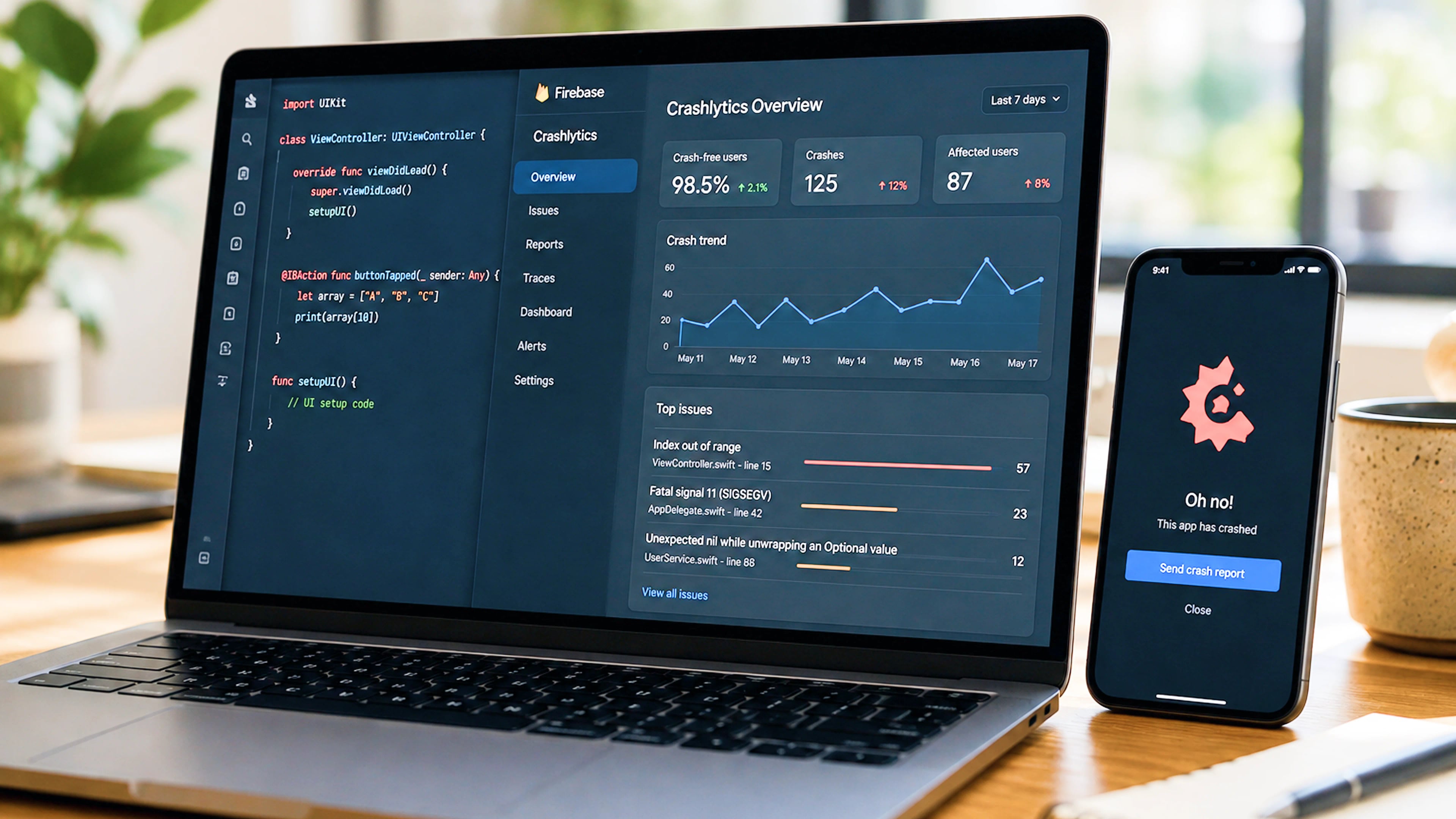
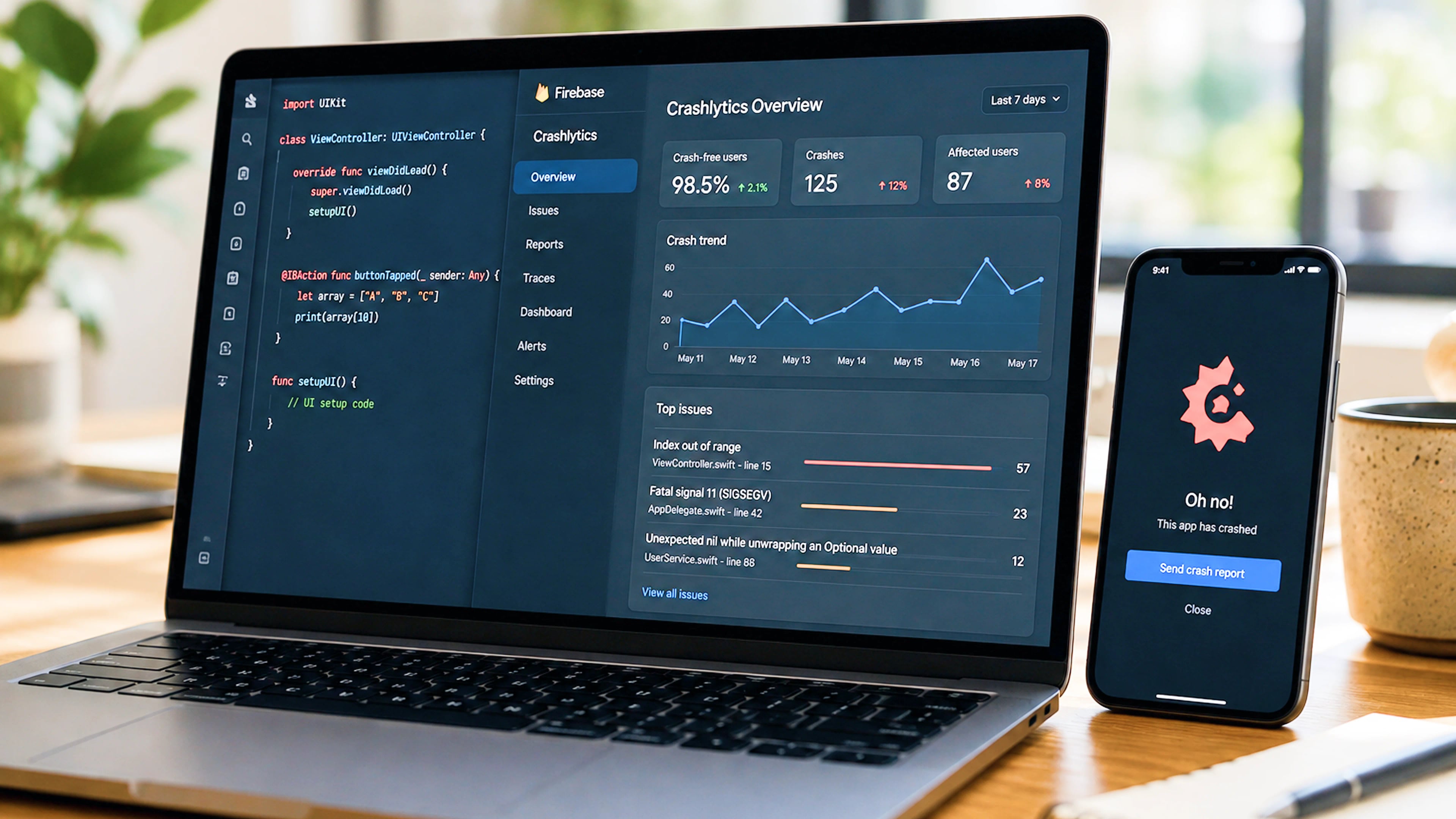
A Complete Guide to Set Up Firebase Crashlytics for Detecting Hidden Errors and Error-free Flutter App
img { max-width: 100%; height: auto; } pre.wp-block-code, pre.wp-block-code code { white-space: pre-wrap; word-wrap: break-word; overflow-wrap: break-word; max-width: 100%; } body, p, div { max-width: 100%; box-sizing: border-box; } Creating an error-free Flutter app is essential for a better user experience. One of the primary concerns that occurs during app Flutter development is crashing the app, which can negatively impact user satisfaction, harm the brand’s reputation, and result in the loss of valuable users or reviews. To prevent these issues, Set up Firebase Crashlytics is a reliable solution as it offers tools to identify and prevent application crashes effectively. This article will help you to learn about Firebase Crashlytics and provide a step-by-step guide to implementing Firebase Crashlytics in Flutter application. Let’s dive deep into it. What is Firebase Crashlytics? Firebase Crashlytics is a powerful tool that can provide real-time crash reporting and helps app owners monitor and track every crash or error occurring within their Flutter application. It provides detailed insights about the causes of these issues, such as pinpointing the exact line of code responsible for the error. This allows developers to quickly identify and resolve problems, ensuring a smoother and more reliable user experience. People also read: FlutterFlow 5.0 Why use Firebase Crashlytics for Flutter? Crash Insights: Get actionable tips to troubleshoot, prioritize, and resolve common stability issues efficiently. Real-Time Reporting: Access near real-time updates with dynamic charts to immediately assess the impact of crashes on user experience. Top New Issues: Track new crashes after each release to decide whether to proceed, halt, or roll back a deployment. Crash-Free Metrics: View automatically calculated percentages comparing crash-free users and sessions across past and current data for better stability analysis. Cross-Platform Integration: Seamlessly integrates with Android, iOS, and Flutter platforms to provide comprehensive coverage for your app. Steps to Set up Firebase Crashlytics within the Flutter App Before starting, make sure you have: - A Flutter project is already set up. - Flutter and Dart SDK installed. - A Firebase account and project were created. Step 1: Create a Firebase Project and Enable Crashlytics Log in to Firebase Console https://console.firebase.google.com/. Create a new project and configure it for your Flutter app. 1.2. Add Firebase Configuration Files For Android: Download google-services.json Place it in the project/android/app directory (google-services.json). For iOS: Download GoogleService-Info.plist add it to the project/ios/Runner directory (GoogleService-Info.plist). Step 2: Install the Firebase Crashlytics Package These applications use artificial intelligence (AI) to recommend the most suitable loans, hence reducing paperwork. They make getting a loan easier and faster. Add the firebase_crashlytics package to your pubspec.yaml file: https://pub.dev/packages/firebase_crashlytics/install Add the necessary dependencies to your pubspec.yaml file: dependencies: firebase_crashlytics: ^3.0.0 firebase_core: ^3.0.0 Run the following command to install the dependencies: Flutter pub get Step 3: Initialize Firebase in Your App Import Firebase in your main.dart file and initialize it: import 'package:firebase_core/firebase_core.dart'; import 'package:firebase_crashlytics/firebase_crashlytics.dart'; void main() async { WidgetsFlutterBinding.ensureInitialized(); await Firebase.initializeApp( Name: ‘Test App’, Option: DefaultFirebaseOptions.currentPlatform, ); FlutterError.onError = FirebaseCrashlytics.instance.recordFlutterFatalError; runApp(MyApp()); } Step 4: Update Platform-Specific Files - For Android: - Update the android/build.gradle file: dependencies { classpath 'com.google.gms:google-services:4.3.10' } - Apply the Google Services plugin in android/app/build.gradle: apply plugin: 'com.google.gms.google-services' - For iOS: - Ensure CocoaPods is installed and dependencies are added to the Podfile. Get Real-Time Insights on App Crashes Implement Firebase Crashlytics in Your Flutter App! Step 5: Test Crashlytics Integration 5.1 Simulate a Crash Once Set up Firebase Crashlytics add the following code snippet to test crash reporting: TextButton( onPressed: () { FirebaseCrashlytics.instance.crash(); }, child: Text('Simulate Crash'), ) Run the app and trigger a crash to verify that it appears in the Firebase Console. Step 6: Check the Firebase Console Navigate to the Crashlytics section to confirm that the crash report has been logged. Debugging and Monitoring Hidden Errors After Set up Firebase Crashlytics, you can uncover: Non-fatal errors: Use FirebaseCrashlytics.instance.recordError() to log errors without crashing the app. Best Practices for Error-Free Flutter Apps - Regular Monitoring: Continuously monitor Crashlytics reports for new issues. - Custom Logging: Use custom keys and logs for detailed debugging. - Error Handling: Implement robust error-handling mechanisms throughout your app. - Frequent Testing: Simulate crashes and non-fatal errors in development to ensure reliability. - Stay Updated: Regularly update dependencies and tools to avoid compatibility issues. Streamline Your App’s Performance Hire Flutter and iOS app development specialists now! Set Up Firebase Crashlytics Now! Conclusion Firebase Crashlytics is an indispensable tool for ensuring your Flutter app is error-free and user-friendly. By setting it up effectively, a Flutter app development company can identify hidden errors, enhance app performance, and deliver an exceptional user experience. Ready to take your Flutter app to the next level? Start set up Firebase Crashlytics today! or Contact us!


Why should you Hire Web Development Company for your Business?
Any business that wants to succeed needs to have a strong online presence. The best way to do this is with a stunning website that represents your business. Despite the fact that website builders may appear to be an easy fix, the quality and understanding of a professional web development company cannot be matched. Sure, you can get your site up and running quickly with a DIY tool, but can you get the unique, professional touch that makes your website stand out? For that purpose, you need to hire a professional web development company. When you hire a web development company, you receive much more than simply a website. You are assembling experts with years of expertise and experience. Their areas of expertise include creating easily navigable, aesthetically pleasing, feature-rich sites. Whether it’s smooth navigation, mobile responsiveness, or custom-built solutions, a professional web development company has the resources to bring your ideas to life. Remember that these professionals possess the skill and tools to enhance your website when choosing the best web development company for hire. Why settle for average when you can be exceptional? So many reasons for working with a professional web development company. In this blog, we will talk about a few of them. Reasons to Hire Web Development Company Google’s website gets 93% of all traffic in the world because it is the most popular search engine. It shows how important it is for businesses to be well-known on Google so they can reach more people. And for that, a web development company is the heart and soul. There are many professionals out there who can help you with web development these days, and the prices are fair. Despite the small price tag, the quality usually lacks the punch you need. Going for a quick fix will not lead to a good website, even if it’s tempting. Given this, hire a web development company with experience and resources. Diverse Skill Set A web development company hires a whole team to build your website, from coders, to designers and writers. It’s like having a dream team where everyone brings something different to the table. You get professionals who have been in the business for a while and know how to make a website look great when you hire a web development company. Highly Trustworthy You can be sure that the work will be done well with a full stack web development company. Since these companies have been around for a while, you can easily read reviews and get in touch with their past clients to find out how they’ve done. Because they’ve done jobs before that turned out well, you may have more faith in their skills. When you work with people or freelancers, there is some risk, though. If you don’t know what they’ve done before, it might be hard to tell if your investment will be worth it. When you work with a full stack development company, you hire a skilled group that has finished projects for other businesses successfully. SEO-Friendly Website If you want your website to show up on search engines like Google, Bing, or Yahoo, building a site that’s SEO-friendly is super important. Search Engine Optimization, or SEO, makes your website show up higher in search results, so more people can find it. A professional web development company can help you avoid making an SEO mistake like using too much JavaScript or having error pages that don’t work right. The best ways to keep a website in good shape for search engines are well known to them. This increases the number of people and the chance that some of them will buy something. Latest Features Technology is always changing, and to stay ahead of your competition, your website needs to keep up. New tools, plugins, and features are constantly being unveiled to make the performance better, security stronger, and user experience more elevated. With the help of a software development company, you hire an experienced team of developers who have been working with these advanced technologies so that your website will remain fresh and efficient. The more you update, the higher the chances your site ranks higher and the more likely to retain visitors. Right updates attract more traffic and engage the visitors for longer periods. Therefore, if you wish to make your website more visible, making sure that it is updated with newer features is the key! Reduced Risk of Unexpected Costs If you hire an inexperienced developer, then initially it may seem very cheap, but later you may end up paying much more. These issues could take the form of bugs, mistakes, or compatibility problems with other systems which would then be critical to repair in-time. On the other hand, when hiring a professional web development company, you are commissioning a team that understands their jobs. They work with the latest tools and technologies and have encountered most situations already; thus, they can identify potential problems’ solutions early on. A full-stack development company ensures everything integrates well from development to deployment, thereby giving you peace of mind and protecting you from hidden costs. It’s like paying for quality upfront with the assurance that there won’t be any unexpected expenses later on. Recommended Article: What are the IOS App Development Costs in 2025? Accountability When you hire a web development business, a group of people are working together to make sure you have a smooth experience. At each step of the process, they bring in experts to make sure that no one is stressed. And more duty comes with it. On the other hand, when hiring a professional web development company, you are commissioning a team that understands their jobs. They work with the latest tools and technologies and have encountered most situations already; thus, they can identify potential problems’ solutions early on. A full-stack development company ensures everything integrates well from development to deployment, thereby giving you peace of mind and protecting you from hidden costs. It’s like paying for quality upfront with the assurance that there won’t be any unexpected expenses later on. Standards Compliant Website When you hire a company, you’re hiring people who know all the rules and guidelines that will help your website work even better. A professional web development business keeps up with industry standards and trends to make sure that your website looks great and works perfectly for everyone. For example, the organization might apply the Web Content Accessibility Guidelines (WCAG) to ensure that all users, including those with impairments, can easily use your website. This ensures that everyone, regardless of ability level, can immediately browse and utilize your website. They will verify that your website adheres to privacy regulations such as the GDPR to ensure that user data is even safer. Transparent Channels of Communication When you are getting your website developed, you need a clear communication channel where it’s easy to communicate with and the experts are always ready to listen to your ideas. They’re easy to get in touch with, and they’ll get back to you quickly whether you need to make a small change or ask for a whole new feature. However, it might be hard to talk to workers who are in different time zones. You might not hear back for hours or even days, and the process might take longer. If you need to talk to someone at a professional web development company, you can always do so because they have a whole team here for you. They can fix problems faster and keep you up to date, which makes sure everything goes well. Top Picks for You: Best Software Consulting Companies in the USA Safety and Security for Users You can be confident that your site will look excellent, function well, and be secure with the help of a professional WordPress website development company. By ensuring that it employs HTTPS, they will guarantee that any data sent between your site and its visitors is protected. They will include a Trust Seal on the checkout page of your website to warn visitors that, when they buy online, their credit card data is secure. It was made much more secure for debit and credit card transactions after PCI DSS compliance was introduced. Important security chores such as data encryption, frequent change management, and user input cleanup to prevent holes will also be handled by a competent full-stack development company. Following these guidelines will enable you to keep the information of your website visitors secure and develop confidence with them. Summing up Picking the right company is very important if you want to make a website that looks good, is safe, and is easy to navigate. If you need to hire a web development company, Innvonix is a great choice. At Innvonix, we make more than just websites. For those who need a professional web development company, we can help you make websites that are both simple and complex. We’ll do everything you need, from making your website mobile-friendly to using the most up-to-date security methods to keep it safe. People know that we are the best web development company to hire because we care a lot about both how your website looks and how it works. Our staff makes sure that your website is flexible and up to date with the latest trends so that you can stay ahead of the competition.


Taxi Booking App Features: How To Build An App Like Uber?
Everyone has used a ride-sharing app such as Ola or Uber, right? They’ve made it simple to get about town. We no longer hail cabs on the street. With a few taps on your phone, you’ll be on your way. The world has really changed, and so have the expectations of passengers. People now want even more — from real-time tracking to easy payments, the demand for next-gen features of the taxi booking app is higher than ever. If you want to build an app like Uber, the right taxi booking app features can really set you apart, but it’s also important to think about the cost to build a taxi booking app. With the right development team, you can create an app that’s easy to use, efficient, and packed with features customers love. How to Build an App like Uber? Uber started out as just a simple taxi booking app, but it has grown into so much more. Uber, originally known as Ubercab, is now one of the biggest companies for mobility as a service. Based in San Francisco, Uber operates in over 70 countries and 10,000 cities around the world. It’s not just about hailing a cab anymore – Uber offers everything from food delivery to freight transportation. Simply put, Uber has completely changed the way we think about getting around. If Uber’s success has you thinking, “I’d love to build an app like that,” you’re in the right place! Here are a few steps you must follow to build an app like Uber. We’ll get into the features of the taxi booking app, the development process, and of course, the cost to build a taxi booking app. Let’s get started! 1. Conduct a Thorough Market Research To build an app like Uber, you have to start by reviewing feedback from existing apps like Uber and identifying what users love and what needs improvement. This helps you understand your target audience and their pain points. Next, define your unique selling proposition (USP) – what will make your app stand out? Will it be faster rides, lower fares, or unique features? Also, consider the taxi booking app features that will address these needs and improve the user experience. - Map out the customer journey to ensure the app is intuitive, from booking a ride to payment. - Study competitors and their marketing strategies to learn from their strengths and weaknesses. - Lastly, gather data on when and where your target users prefer to book rides. This research will help you create an app that fills gaps in the market and meets customer demands, while also helping you estimate the cost to build a taxi booking app. 2. Must-Have Features of the Taxi Booking App Once you have researched completely, you have to list a few taxi booking app features. Here are a few must-haves. Admin App Features Driver App Features User App Features Location and Rating Management User Registration User Profile Driver and Service Management Trip Notifications Service Booking Booking Management Pickup Location for Trips Fare Estimator Vehicle Oversight Push Notifications Real-Time GPS Tracking Ratings and Reviews Monitoring Driver Delivery Reports Push Notifications Promotions and Offers Accepting new Ride Requests Rating and Review System Notifications Management In-App Messaging and Calling In-App Calling Ride History 3. Advanced Features you must Consider When it comes to building an app like Uber, you don’t just want to replicate what’s already out there. Instead, you need to go the extra mile and offer more advancements that can truly set your app apart. Think about adding advanced features of the taxi booking app that make the user experience smoother and safer. - Heat Maps: Shows areas with high passenger demand. Helps drivers position themselves in busy locations for quick ride requests and helps improve service based on customer preferences. - Panic Button: Provides passengers with an emergency alert option. Sends notifications to admins, security, and contacts, ensuring help is available if needed. - Edit/Cancel Order Service: Allows users to modify or cancel bookings easily. Provides flexibility and enables refunds for canceled trips paid via cards. - Smart Analytics System: Collects data on ride requests and user behavior. Helps identify trends and areas for improvement, leading to better decision-making and app optimization. - Booking History: Stores past trips for passengers and drivers. Passengers can easily rebook, and drivers can track their earnings and ride history. - Save/Favorites: Lets users save frequent destinations for easy access. Saves time by eliminating the need to re-enter addresses for regular trips. - Multi-Language Support: Enables users and drivers to select their preferred language. Enhances accessibility and makes the app more inclusive for a diverse audience. 4. Choose A Mobile App Platform One of the first decisions you must make while preparing to build an app like Uber is selecting the best mobile app platform. So, can you tell me what that means? To be more specific, native applications and hybrid apps are the two most common types. One example of a system-specific app is iOS, which is designed for iPhones, and Android, which is designed for most other phones. Apps like this are known to be more efficient and feature-rich. However, if you want to expand your audience reach without having to construct two distinct applications, hybrid apps are a great option since they can be used for both iOS and Android app development. How can you then choose the optimal choice for your app? - Exactly where are your users? Phones used by people in various regions of the globe vary. While iPhones rule in certain regions, Android reigns supreme in others. - Approximately how much time do you have? Because it only requires one set of source codes to run on both iOS and Android, a hybrid app may help you meet your tight release deadline. - How complex is the application? A native app might be the way to go if your software offers a lot of special features. Still not sure? No problem! A professional mobile app development team can help you make the best decision based on your needs. 5. Find the Right Company to Build an App like Uber When you want to build an app like Uber, then choosing the right development company would be a very critical step in achieving that. The company you are going to choose will play like a partner throughout so do your homework first of all, check their portfolio about how many successful projects they have accomplished and for what long time they have been doing this business. You would want a company that knows the inside and out of taxi booking app features, whether it is iOS app development or flutter app development. Also, make sure that the communication style works well with you. 6. Development of the App It’s when you’ve chosen your team that the real fun starts. This will require some planning in building your taxi booking application. Well, that is where agile comes in. Agile simply means the app is built incrementally adding new features and testing as it is being developed. It’s just like a series of mini-projects to the final product. With this agile approach, you can always improve your app while in the development stage in such a manner that every feature actually works before working on it. 7. Test and Launch Before launching any type of Uber-like app in a market, one would want everything to work perfectly, and that’s precisely when you test your application. The app undergoes different kinds of tests: - Smoke Testing (basic checks) - Functionality Testing (making sure all features work) - UI Testing (ensuring the layout looks good) - Performance Testing (checking speed and usability). Once everything passes the tests and the app runs smoothly, it’s time to launch it on the App Store and Google Play. Related Article: What is AI TRiSM? Cost to Build a Taxi Booking App like Uber The cost to build a taxi booking app can vary widely depending on the features you want to include and the complexity of the app. The more advanced the taxi booking app features, like real-time GPS tracking, payment integration, and ride history, the higher the cost. The design is also a key factor; a user-friendly, attractive app needs careful planning. You also need to consider development and code optimization for smooth performance across platforms like iOS and Android. Additionally, backend development ensures all processes run smoothly. The location of the development team plays a significant role in the overall cost, as rates vary from region to region. Ultimately, building an app like Uber requires a balanced approach between functionality, design, and development to get the right price for your business. Recommended for you: The Concept of ‘AI Creating AI Building the Next Generation of Taxi App with Innvonix If you’re looking for the right company to help you build an app like Uber, Innvonix is here to guide you every step of the way. We don’t just create apps; we help you craft a taxi booking app that’s one step ahead of Uber! With our expertise, we’ll ensure your app includes the best taxi booking app features to make your business stand out. Whether it’s smooth design, smart functionalities, or top-notch performance, we’ve got it all covered. And the best part? We do it all within your budget. Our team at Innvonix is ready to turn your idea into a reality that not only meets but exceeds your expectations. So, let’s get started and make your taxi booking app the next big thing!


How to make a Fintech app? A blueprint for constructing your vision.
Building a fintech app might sound like a piece of work, but don’t worry—it’s all about taking one step at a time. With how fast fintech application development is changing the way we manage money, now’s the perfect moment to join the game. Fintech apps are making it easier and more convenient to manage your money and keep track of your spending. You can even use them to ask for loans from the comfort of your couch. What does it take to make one, though? Knowing how much it will cost to build fintech app, listening to what users want, and including the right features are all important. Let’s figure out how to make FinTech tools better, safer, and easy for everyone to use. Before we move ahead, let us understand what Fintech is and the market analysis of the same. What is FinTech? FinTech leverages technology to make financial services faster, safer, and more accessible. It covers a wide range of activities, like making online payments, transferring funds, and managing your finances with ease. With FinTech apps, you can track your spending, plan your financial goals, and even purchase insurance—all directly from your smartphone. These apps also use advanced tech to protect your data, so you can feel safe when making transactions. If you’re curious about how to make fintech app, it’s all about offering the right features of the fintech app that solve real problems for users. People also read: Top Blockchain Companies in USA Overview of FinTech Market Fintech markets are on the rise and it is clear that it is becoming an increasingly prominent part in everyday life. The market value of digital assets is evaluated as $80.08 billion in 2024, whereas in the digital payments sphere, 4.8 billion individuals will be users in 2028. The fintech business in India is quickly expanding, with a market predicted to be worth $1.5 trillion by 2025. It’s no wonder that everyone is looking at how to create a financial app to capitalize on this goldmine. Businesses are keen to join in on the activity, whether it’s adding exciting features of the fintech app or figuring out how much does it cost to build fintech app. With all of this growth, it’s evident that fintech application development is here to stay, and the sky’s the limit! Types of FinTech Apps Here, trained experts physically show up at your workplace to join your team. Projects that need extensive communication, in-person meetings, and cohesive teams will benefit greatly from this setup. If seamless communication is key, this option works like a charm! Wealth and Investment Apps Using these applications, purchasing stocks or ETFs is a breeze, and they even provide personalized investing recommendations. A great way to amass cash without ever having to leave your phone. Mobile Payment Apps Perfect for international money transfers, these applications often offer a history of your transactions and a currency converter. Lending applications These applications use artificial intelligence (AI) to recommend the most suitable loans, hence reducing paperwork. They make getting a loan easier and faster. Personal Finance Apps Apps that help users create and stick to budgets make it easier to keep tabs on money. You can see exactly where your money is going with their help. Cryptocurrency Apps Wallets, investing, and payment capabilities are all part of the digital currency management software package. If you’re thinking about trading or storing cryptocurrency, you must need them. Neobanks They are digital-only banking applications that provide all the services of regular banks, but without the physical branches. They serve the unbanked, those who utilize e-commerce, and freelancers. How to Make FinTech App: A Few Steps Building a fintech app isn’t rocket science, but it does need careful planning and execution. Let’s break it down step-by-step so anyone can follow along. Whether you’re working on fintech application development for Android app development or iOS app development, this guide will set you on the right track. 1. Start with a Great Idea A brilliant concept is the bedrock of each successful software. If you could address one financial issue, what would it be? Maybe it’s facilitating easier payments, assisting with better saving, or providing investing guidance. Go farther when you’ve solidified your notion. Look into the marketplace. Who needs what? How do other applications function? If you know this, you’ll be more noticeable. You may get insight into how to make fintech apps that not only address issues but also adhere to rules by working with financial specialists during this phase. 2. Understand Your Market Before you jump into development, get your facts straight. Market research is one of the useful means to understand the needs of consumers and different gaps in existing offerings. The process, as a whole, resembles the preparation for an exam: afterwards, one is clear-headed and confident. The methods for data collection include direct surveys, focus groups, and competitive analysis. Don’t overlook the importance of researching the legal environment. In the fintech industry, where trust is everything, regulatory compliance is absolutely essential. Starting early to ensure your program meets all the required standards makes the process much smoother and helps build a solid foundation for success. 3. Define Your App’s Features Determining the essential characteristics of the fintech app is the most important factor in the development process. Top 6 features to include in your fintech application development: Accounting Management Allow user logins with safeguards such as biometric authentication or two-factor authentication. This keeps accounts safe while making logins quick. Advanced Sign-In/Login Secure user logins may be enabled using methods such as biometrics or two-factor authentication. Logins are made easy and secure in this way. Payment Gateway Integration Whether it’s PayPal, Stripe, or Zelle, adding a payment gateway makes transactions seamless. Think of this as the backbone of any fintech app. Push Notifications Keep users updated about their accounts or send helpful reminders. A simple nudge can improve engagement and satisfaction. Transaction History Everyone likes to know where their money went. Add clear transaction records with dates, times, and other details to make tracking easy. 4. Emphasis on Security It goes without saying that people must feel safe when placing on your application. Use apps like encryptions, biometric locks, and multi-factor logins to ensure their information is safe. You cannot just have security in your application; it is an essential aspect of making such an app work and gaining trust among users. 5. Design an Amazing Interface Nobody likes clunky apps. A clean, intuitive design can either make or break the user’s experience. A simple layout can let users manage seamlessly. Be it Android or iOS, your app must function seamlessly across devices. Make buttons easy to click, menus easy to find, and processes straightforward. 6. Develop the App Everything you’ve imagined will materialize here. Whether you’re working on Android or iOS app development, using the right tools and frame will make the process much easier. Software developers will build the program, add your desired features, and test it thoroughly to ensure it meets your needs. Scalability is also vital. Your app should be able to manage additional users and features as it expands. Don’t forget to do thorough testing throughout development to detect and repair errors early. 7. Test, Test, and Test Again Before your app hits the market, it needs a thorough quality check. Make sure to test your app thoroughly in every possible way—usability, performance, security, and accessibility. Simulate real-world scenarios to see how it performs under different conditions. An app that’s well-polished not only attracts users but also keeps them coming back for more. 8. Launch the App Releasing your app is a significant event. Publish it on app stores such as Google Play and the Apple App Store. Promote your app till the final hour so that people know about it once they start downloading it. Make sure you keenly monitor all feedback. This starts the ball rolling. Keeping your app updated with relevant features at regular intervals will ensure the app’s buoyancy in the ever-shifting landscape of fintech firms. People also read: Web3 in Finance Cost to Build FinTech App Creating a fintech app isn’t a one-size-fits-all deal, and the costs can vary quite a bit. The price tag depends on several factors, like how complex the app is, the features of the fintech app, and whether you’re going for native apps (specific to iOS and Android) or cross-platform options like Flutter app development. If it includes extra features like AI, blockchain, or custom animations- the price will go up. The price is usually capped at only $80,000 for a basic app. But, things like a Fintech application development project is a little more complex which could get to $300000. To keep things manageable, start with an MVP (Minimum Viable Product). It’s a smart way to test the waters, focus on core features, and plan your budget better. Innvonix – Shaping the Future of Fintech Fintech app development is simple with Innvonix. Do you want to know how to develop a top-class fintech app that is safe and scalable, too? Calm down. We have you under our protective wings. Our certified professionals possess expertise in fintech application development, including up-to-date technology and adherence to rule compliance. That’s one thing you’ll no longer need to worry about, so go ahead with your idea. You can stop worrying about the details and focus on making your vision a reality since we’ve got this. We make our applications great by concentrating on the most significant aspects of every fintech application- security, speed, and usability. With expertise in mobile app development, we will be with you from conception to the beginning of the app itself. When it comes to finding a way through the fast-moving fintech world, you can count on us to deliver creativity and excellence.


What is Staff Augmentation? How Staff Augmentation Benefits Business Growth?
Business growth is exciting, but no one said it was all sunshine and rainbows. All of a sudden your to-do list is endless, you need certain skill sets that you don’t have the people to provide in house, you just can’t seem to find enough hours in the day. Staff augmentation is the key to turning things around. Think of it as getting the right people, at the right time, for the right job. Whether it’s website development, resource augmentation, or tackling a big software project, resource augmentation services can help you fill the gaps and move your business forward. This piece will go over the many benefits of staff augmentation for business growth. First things first, let’s define staff augmentation. People also read: Top Blockchain Companies in USA What is Staff Augmentation? Staff augmentation is like adding an extra set of hands when you need them most. Instead of hiring full-time employees, you bring in skilled professionals to fill the gaps in your team. It’s a practical way to tackle specific tasks or short-term projects without the hassle of permanent hiring. And here’s an eye-opener: the resource augmentation market is growing fast, with revenues expected to hit $1,493 billion by 2025, growing at 11% annually. It’s a smart move many businesses are turning to! Types of Staff Augmentation Models Regarding resource augmentation, there are many models to fit your situation. On-Site Staff Augmentation Here, trained experts physically show up at your workplace to join your team. Projects that need extensive communication, in-person meetings, and cohesive teams will benefit greatly from this setup. If seamless communication is key, this option works like a charm! Remote Staff Augmentation Here, experts work from anywhere in the world. It’s great for accessing a global talent pool, especially for specialized skills like mobile app development services. While it’s cost-effective and flexible, having good project management tools is a must to keep everyone on the same page. Project-Based Staff Augmentation For short-term tasks or one-off projects, this is your go-to. You hire specialists for exactly what you need—no strings attached. It’s an efficient way to handle unique challenges without overloading your permanent team. Teamwork Staff Augmentation At times, the whole team needs to take the lead. With this option, you can quickly finish difficult jobs by calling in a team of experts who have already been put together. People also read: Web3 in Finance Who Needs Staff Augmentation? Resource augmentation is versatile and fulfills a range of needs. Here are a few benefits of staff augmentation in various scenarios. Scenario What is the Challenge? How Staff Augmentation Helps Startups Scaling Quickly Rapid growth and need for skilled professionals without the budget or time to hire full-time staff. Staff augmentation allows startups to quickly bring in experienced professionals without long-term commitments, keeping costs flexible. Filling specialized skill gaps Lacking in-house experts for a specific project or task. Resource augmentation fills the gap with temporary, skilled professionals who bring specialized knowledge, without the hassle of permanent hiring. Businesses with Fluctuating Workloads Seasonal or project-based workload spikes, needing extra help temporarily. Staff augmentation provides temporary talent to meet the increased demand, letting businesses scale quickly and efficiently. App Development Agencies Meeting Tight Deadlines Multiple overlapping projects with tight deadlines, stretching in-house resources thin. Staff augmentation brings in extra developers or testers to meet deadlines, ensuring high-quality results without rushing existing teams. Enterprises Managing Large-Scale Projects Undertaking huge projects that require additional manpower for a limited time. Companies can use staff augmentation to bring in extra project managers, developers, or analysts just for the duration of the project, ensuring success. Firms Needing to Accelerate Time-to-Market Pressure to launch products faster than competitors. With staff augmentation, companies quickly hire additional specialists, speeding up development and shortening the time-to-market for new products. Organizations Facing Economic Uncertainty Hesitant to hire full-time employees due to financial concerns. Resource augmentation offers a flexible solution, letting businesses bring in talent temporarily, without long-term financial commitments. Sectors Upgrading IT Infrastructure Companies needing to upgrade tech but lacking in-house expertise. Resource augmentation allows businesses to hire IT specialists for short-term projects, keeping their operations running smoothly without long-term hires. Agencies Enhancing Client Offerings Expanding service offerings (e.g., adding app development) without extra permanent hires. Staff augmentation helps agencies quickly bring in the necessary talent for new services, testing them out without the pressure of full-time hires. Recommended for You: FlutterFlow 5.0: Revolutionizing App Development Benefits of Staff Augmentation for Business Growth Cost-Effective Solutions One of the main benefits of staff augmentation is that it is reasonably priced. You might save a lot of money if you hire experts only when you need them instead of paying them full-time and paying for their benefits and training. By doing this, you might save money without giving up the skills you need for a job. Flexibility Staff augmentation allows you to scale your workforce up or down quickly. If your business is facing a busy period or working on a big project, you can easily bring in extra hands. When the work slows down, you can reduce the number of temporary staff without the stress of layoffs. Access to Specialized Talent There are times when your staff doesn’t have all the tools they need to complete a task. This service can help you find the right people, whether you need a data scientist or an expert in protection. This will help you stay on track with your projects and avoid information holes. Quick Hiring Process There may not be enough time to hire new staff when deadlines are looming. The recruiting procedure is streamlined with the help of resource augmentation. You are able to keep your initiatives on track since you are able to get the necessary talent promptly. Enhanced Project Speed When time is of the essence, staff augmentation is literally life-saving. Since the specialists you hire are ready to begin immediately, you won’t have to spend time teaching them. Faster completion of projects gives more time to meet deadlines and preserve a competitive advantage. Better Focus on Core Business Activities The benefits of staff augmentation includes outsourcing specific tasks to augmented staff. Given that, your in-house team can stay focused on what they do best. You’re able to keep your core operations running smoothly while bringing in outside help for specialized work. Reduced Risk Some chores have hazards, particularly in the IT industry. By bringing in professionals via resource augmentation, you are less likely to run into errors or hazards that can ruin your initiatives. These experts guarantee more seamless and safe operations by bringing their expertise to the fore. Scalable Workforce Staff augmentation helps you adjust the size of your team based on your needs. If you’re running a short-term project or dealing with a sudden increase in work, you can quickly add extra people to the team. Once the project ends, you can scale back. It avails the possibility of bypassing all this complexity surrounding long hiring periods and unnecessary payroll expenses. Global Talent Pool One of the important benefits of staff augmentation is that it enables tapping of a global talent pool. Thus, organizations are not confined to local hiring practices. Whether you need a specialist in another city or a completely different country, staff augmentation makes it easy to tap into this broader market and find the right person for the job. Filling Gaps in Expertise No matter how skilled your team is, there will always be projects that require expertise your current staff doesn’t have. Staff augmentation allows you to fill those gaps by bringing in people with the exact skills you need—whether it’s for a one-off project or something more ongoing. Minimized Overhead Costs Additional expenses, such as those for benefits, equipment, and office space, arise when full-time staff are hired. By bringing in specialists on an as-needed basis, staff augmentation helps you keep overhead expenses down by keeping things lean and efficient. Improved Time-to-Market In business, time is money. Staff augmentation helps you improve your time-to-market by allowing you to bring in skilled professionals quickly. With the right people on board, you can get your product or service to market faster, giving you a competitive edge. Reduced Employee Burnout Any kind of pressure on in-house people eventually results in burnout. Staff augmentation reduces pressure as the support will be given at any given time, thereby allowing permanent employees to focus on their core responsibilities with no feelings of undercompensation. Easier Project Management Managing resources may be a real challenge when you have a lot of projects going at once. Staff augmentation is useful since it gives you the additional hands you need to manage difficult tasks. By delegating certain duties to augmented workers, you may let your in-house team focus on strategic initiatives. Temporary Talent for Short-Term Projects Staff augmentation is an excellent choice if you only want temporary assistance. Employing someone on a project-by-project basis allows you to get the necessary skills without committing to a long-term employee, which is an advantage over employing someone full-time. People also read: AWS Managed Blockchain Struggling with Staffing? Innvonix Has the Solution! In a nutshell, organizations that want to rapidly and effectively increase their teams need staff augmentation. The benefits of staff augmentation are undeniable, regardless of whether you’re looking for certain abilities like AI ML development services or need to manage an unexpected increase in projects needing any other expertise. This adaptable and reasonably priced alternative helps companies keep ahead of the curve. And when it comes to staff augmentation, Innvonix has got you covered! We’re here to help you find the right talent, at the right time, without the long-term commitment. So if you are thinking of hiring staff augmentation for your company, the simplest answer might be: without headache, it can help you fly to new heights. Help in navigating this world of staff augmentation? Then get in touch with us, and schedule a free consultation on how we can collaborate to give your business the boost it needs. At Innvonix, you’re among great hands!


What is AI TRiSM? Benefits, Industries, and Applications
AI is changing the world around us, making it easier, faster, and more efficient. From helping doctors diagnose better to powering your favorite apps, AI has entered almost every aspect of our lives. As potent as AI may be, it has drawn the attention of serious discussions around AI security and AI risks. Defined by Gartner, AI TRiSM stands for AI Trust, Risk, and Security Management, and it’s a framework designed to keep AI systems safe and reliable. It helps businesses find and fix potential problems, ensuring AI is not only useful but also trustworthy. By directing its focus toward areas such as data security, model operations, and privacy, AI TRiSM prevents manipulation thereby ensuring that AI models perform their functions correctly. In this blog post, we will get into the details of what AI TRiSM is, why it is important for businesses, and how it relates to improving AI management. We’ll explore some practical industrial uses and examples. So, if you’re curious about AI risk management and how to make AI systems safer, keep reading! What is AI TRiSM? So, what is AI TRiSM? Simply put, it’s like a set of rules that helps businesses keep their AI safe, reliable, and fair. Gartner defines it as a framework that ensures AI models are trustworthy, fair, reliable, and secure. AI TRiSM helps detect potential risks when using AI and guides businesses on how to fix them. AI TRiSM also focuses on AI security, making sure that the data and AI models are safe from attacks. In industries like cybersecurity, where DarkTrace email security uses AI to protect from threats, it’s essential to make sure no one can tamper with the system. So, whether it’s security, fairness, or reliability, AI TRiSM has got it covered. Now, let’s check into the main pillars of AI TRiSM, the essential building blocks that keep AI working smoothly and safely. The AI TRiSM framework is built on four key pillars that help keep AI systems safe, trustworthy, and reliable. Let’s break them down in simple terms: - Explainability/Model Monitoring – This pillar makes sure AI models are like open books. It’s all about being able to understand how and why AI makes decisions. When AI can explain its choices, it builds trust, just like how you’d trust a friend who’s honest and upfront with you. - ModelOps – This pillar helps streamline everything, from developing AI to making sure it works smoothly once it’s up and running. Think of it like taking your car in for regular checkups to make sure it runs perfectly every time you drive. With AI management, it helps businesses make sure their AI is always improving. - AI Application Security – Just like locking your doors at night, AI security is about protecting AI systems from bad actors and cyber threats. It ensures that data stays safe and systems keep running smoothly. Take DarkTrace email security, for example. It uses AI to protect businesses from email threats, making sure hackers can’t get through. - Model Privacy – This pillar is all about keeping sensitive information safe and making sure businesses follow privacy laws. It uses methods like anonymizing and encrypting data to ensure that nothing private gets exposed. It’s like having a safe that only you have the key to. By sticking to these four pillars of AI TRiSM, businesses can make sure they’re using AI safely while also gaining trust from their customers. People also read: The Ultimate Guide to IoT in Agriculture and Farming Benefits of AI TRiSM Now that we have learnt what is AI TRiSM and its pillars are, here are five big advantages of using AI TRiSM for your business. Build Trust Through Transparency Ever used an app and wondered how a certain decision was made? You might have thought about how a recommendation system could pronounce that specific song or route. AI TRiSM does the hard work of explaining how AI models work and, therefore, opens up the animation for everybody to see. This transparency builds trust with your audiences because they appreciate the rationale behind AI’s say-do decisions. Keeps Your AI Safe from Cyber Threats Just as you would lock a door to protect your home, you must put your AI systems behind locks. AI security is certainly in place to keep away attacks that might cripple your operations or steal away valuable data. With tools like Dark Trace email security, businesses can defend themselves from sneaky cyberattacks that may look to manipulate AI models. With its reinforcement of one’s borders, AI TRiSM makes sure that AI remains trustworthy and tough, protecting your data and business operation. Mitigates AI Risk Before It Happens This AI risk has been taken with utmost seriousness by businesses. With AI TRiSM, risks will not come sneaking up on you at all. This framework foresees possible pitfalls and lets you tackle them prior to them doing any harm. If this could be handled even before they arise, businesses could keep a tight grip on their investments and be able to flourish without unwarranted worries for disruptions. Ensures Fairness and Ethics in AI Decisions One of the greatest strengths of AI TRiSM lies in its tendency to promote fairness and ethics in AI systems. From hiring decisions to product recommendations, this framework ensures that AI systems are exercising unbiased faculties. The AI management tools of AI TRiSM provide the assurance that AI systems operate as close to the standard of impartialness as is practically possible. Compliance Under the General Partner Legislation There are a variety of laws and regulations governing AI technologies. Fortunately, AI TRiSM helps ensure that your AI systems stay on the right side of the law. The AI risk management, privacy, and security of this framework will help comply with the changes in regulations related to AI use. People also read: AI in Real Estate: Driving a New Era of Innovation Industry Use Cases and Real-Life Use Cases Healthcare The AI TRiSM ensures the safety, reliability, and accuracy of the AI technology to be applied in assessing and treating patients. Patients’ information is protected as private and, therefore, should be kept confidential such that decisions taken by AI should be trustworthy and ethical. This leads medical staff to make the best decisions with the least possible error as it looks at security for the AI and the risk factor associated with AI. Real-Life Example: Pfizer uses the AI TRiSM while developing new medicines. It protects the safety of patients while also making sure that it has done everything correctly by using an AI. Such AI technological management ensures efficiency and security, hence reducing the number of errors that can be made when developing new medicines. Banking and Finance The particular sector of banking and finance are highly represented in AI TRiSM by precision, the safety of technologies while dealing with transactions, or financial data. Among the security tools are dark trace email security-one, which guards against frauds and regulatory compliance. It also guarantees that the financial AI makes reasonable judgments, therefore establishing accountability over the AI risk. Real-life Example: JPMorgan Chase uses AI TRISM to automatically execute financial compliance and protects money-handling systems with high ratings for trustworthiness and security. Millions of data on scan by AI TRISM allow fraud detection by automatically identifying integrity in transactions and public trust. Retail and E-commerce In retail and e-commerce, the business can benefit from the customer experience with high degrees of personalization while maintaining the confidentiality and security of customers’ data using AI TRiSM. This, in turn, would minimize the chances of AI decisions harming by empowering businesses to avoid violation of applicable laws or guidelines that detail ethics in information handling within the boundary of privacy law. Risk management through AI will ensure that businesses maintain consumer trust. Real-Life Example: Amazon uses AI TRiSM to serve a shopper with the best recommended products while being responsible and secure in using customer data. Amazon is relying on generative AI services through which it can predict what a customer might want to buy next based on the improvement of his shopping experience without violating his privacy. People also read: How to Build an AI Agent Trust Innvonix to Lead the Way If you want your AI models to be more than simply smarter—they should be safer and more reliable—Innvonix is the company to work with! With our AI ML development services, we help make AI that is reliable and strong. We lower AI risk while increasing AI security with AI TRiSM. At Innvonix, we put your data’s safety first and use AI management to make sure everything runs smoothly. We’re here to help you keep your email safe with cutting-edge dark trace protection or run your AI systems efficiently by following best practices. As a top AI ML development company, we work with you to make sure that your AI solutions are secure and scalable.